0 ratings






Artikelnr.:
219426644
OWC Thunderbolt Go Dock, 11 Ports, Built in Power Supply, 90W Charging, TB4 (USB-C), USB, HDMI, 2.5GbE, SD, Also Compatible with USB-C Devices,
87% der Befragten würden dies einem Freund empfehlen
Artikelnr.:
219426644
CHF 240
Price Details
Excluding Shipping & Custom charges ( Shipping and custom charges will be calculated on checkout )
*All items will import from USA
Auf Lager
 Vom USA Store für Sie importiert
QTY:
Nur noch 20 Artikel auf Lager.
Bestellen Sie jetzt und erhalten Sie es am Samstag, Juli 04
Gesicherte Transaktion
Ubuy ist bestrebt, Ihre Sicherheit und Privatsphäre zu schützen. Unser fortschrittliches Zahlungssicherheitssystem gewährleistet Vertraulichkeit, indem Ihre Daten während der Übertragung mit AES (Advanced Encryption Standards) und SSL (Secure Socket Layer) Protokollen verschlüsselt werden. Ihre Zahlungsdaten sind 100% sicher, da wir Ihre Zahlungsdaten nicht an Drittanbieter weitergeben.
Unsere besten Logistigpartner


Power and charge your devices with up to 85W while enjoying ultra-fast data transfer speeds with our versatile hub.

Fast
Shipping

Kostenlose
Rücksendung*

Sichere Verpackung

100 % Originalprodukte

PCI DSS-Standards

ISO 27001-zertifiziert


Note: Step Down Voltage Transformer required for using electronics products of USA store (110-120). Recommended power converters Jetzt kaufen.


Produktdetails
- Supports new Intel Thunderbolt Share technology with full Thunderbolt Share enablement and license for Intel Thunderbolt Share included.
- Power Delivery: Thunderbolt 4 host port provides up to 90W of power to the host computer; Built-in power supply eliminates heavy power brick hassle while enabling more workflows vs bus-powered docks; Thunderbolt 4 device ports (for external drives and other devices) provide 15W of power; USB port provides up to 1.5A of power for bus-powered drives and device charging
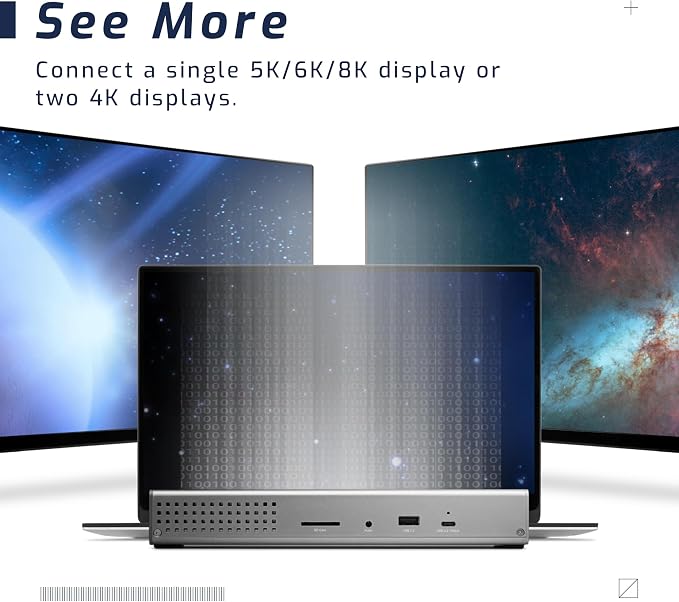
- Display Support: Up to one 8K display @ 60Hz, one 4K display @ 120Hz, two 4K displays @ 60Hz, two 5K displays @ 60Hz; Display Support by Port: Thunderbolt 4: Up to 8K @ 60Hz or 4K @ 120Hz via a native Thunderbolt 4 display or other display that supports USB-C connections and DisplayPort 1.4; NOTE: Actual display support varies by computer specifications; Supported Intel-based Apple Mac models and Thunderbolt 4 PCs support two displays
- Dual display support, including available resolution and refresh rates, is dependent on host hardware and drivers; Silicon M1 Pro, M1 Max, and M1 Ultra Mac models, Intel-based Mac models, and Thunderbolt 4 PCs can support up to two displays at up to 4K @ 60Hz via Thunderbolt; Silicon M1, M2 and M3 Mac models can support one external display up to 4K @ 60Hz via Thunderbolt
- Device Ports: (1) Host Port - Thunderbolt 4 up to 40 Gb/s (5000 MB/s); Works with Thunderbolt or USB (USB-C or USB-A) host port; (2) Thunderbolt 4 (USB-C) Ports; (1) USB 3.2 Gen 2 Type-C Port up to 10Gb/s (1250MB/s) - USB 2.0/3.0 backwards compatible; (2) USB 3.2 Gen 2 Type-A Ports up to 10Gb/s (1250MB/s) - USB 2.0/3.0 backwards compatible; (1) USB 2.0 Port; (1) HDMI Port; (1) 2.5 Gigabit Ethernet (2.5GbE) RJ-45 Port; (1) 3.5mm Stereo Audio Output Port; (1) Secure Digital (SD) SD 4.0 UHS-II
- Compatible with USB-C Macs, PCs, iPads, Chromebooks, and Android host computers and devices with Thunderbolt 4, Thunderbolt 3, USB4, or USB (Non-Thunderbolt USB connection may limit some functionality).
| Hardware Interface | Thunderbolt, USB, USB Type C |
| Compatible Devices | Compatible with Thunderbolt and USB-C Macs, PCs, iPads, Chromebooks, and Android Devices (Thunderbolt 4, Thunderbolt 3, USB4, and USB host computers and mobile devices) |
| Total Usb Ports | 6 |
| Number of Ports | 11 |
| Total Number of HDMI Ports | 1 |
| Wattage | 90 watts |
| Smart Home Compatibility | Not Smart Home Compatible |
| Item Dimensions L x W x H | 9.5"L x 3.6"W x 1.4"H (24.1 x 9.1 x 3.6 cm) |
| Item Weight | 2.09 Pounds (950 grams) |
| Brand | OWC |
| UPC | 810100980757 |
| Manufacturer | Other World Computing |
| Model Number | OWCTB4DKG11P |
| Mfr Part Number | OWCTB4DKG11P |
| Color | aluminum |
| Compatible Devices | Compatible with Thunderbolt and USB-C Macs, PCs, iPads, Chromebooks, and Android Devices (Thunderbolt 4, Thunderbolt 3, USB4, and USB host computers and mobile devices) See more |
| Total USB Ports | 6 |
| Product Dimensions (L x W x H) | 9.5"L x 3.6"W x 1.4"H (24.1 x 9.1 x 3.6 cm) |
| Total HDMI Ports | 1 |
PRODUKTBESCHREIBUNG
Haben Sie eine Frage? Mit uns chatten
Kunden Fragen und Antworten
-
Frage:
What is the primary purpose of the OWC 14-Port Thunderbolt Dock?
Antworten: The OWC 14-Port Thunderbolt Dock serves as a comprehensive connectivity solution for modern devices. It allows users to connect multiple peripherals like external drives, displays, and other USB devices simultaneously. With its wide range of ports, this dock is perfect for creative professionals, gamers, and anyone requiring high-speed data transfer and efficient workspace management. -
Frage:
What types of devices can I connect to the OWC Thunderbolt Dock?
Antworten: You can connect a variety of devices to the OWC 14-Port Thunderbolt Dock, including external hard drives, SSDs, monitors, and other USB peripherals. This versatility makes it ideal for users who work with multiple gadgets, as the dock supports Thunderbolt 3 technology, ensuring fast data transfers and high-resolution displays. -
Frage:
How much power does the OWC 14-Port Dock provide for charging?
Antworten: The OWC 14-Port Dock includes 85W charging capabilities, allowing you to charge your laptop and other connected devices efficiently. This feature is particularly beneficial for individuals who require their devices to maintain high performance during heavy tasks, such as video editing or 3D modeling, where sustained power is essential. -
Frage:
Does the dock support dual monitors?
Antworten: Yes, the OWC Thunderbolt Dock supports dual monitors. With its Mini DisplayPort and Thunderbolt connections, users can seamlessly extend their desktop to two displays, enhancing productivity in multitasking scenarios. This makes it an excellent choice for professionals who often work with complex visual layouts. -
Frage:
Can I use the dock with non-Apple devices?
Antworten: Absolutely, the OWC 14-Port Thunderbolt Dock is compatible with both macOS and Windows operating systems. This makes it a versatile choice for users with various devices, ensuring seamless connectivity and functionality regardless of brand preference. -
Frage:
What is the data transfer speed of the ports on the dock?
Antworten: The dock features two Thunderbolt ports capable of 40 Gbps transfer speeds and USB 3.2 ports that offer data rates up to 10 Gbps. This combination allows users to transfer large files quickly and efficiently, which is particularly useful for multimedia editing and data-intensive applications. -
Frage:
Is there an audio output option available on the dock?
Antworten: Yes, the OWC 14-Port Thunderbolt Dock includes an audio output, making it convenient for users who need to connect headphones or external speakers. This feature supports a complete workstation setup for both professionals and casual users who enjoy high-quality audio. -
Frage:
How does the docking station enhance a workspace setup?
Antworten: The OWC 14-Port Thunderbolt Dock consolidates multiple connections into one central hub, minimizing cable clutter and maximizing workspace efficiency. It’s particularly beneficial for individuals who frequently plug in and unplug devices, providing a streamlined solution for their technological needs. -
Frage:
Is the OWC Thunderbolt Dock portable?
Antworten: While primarily designed for desktop use, the OWC 14-Port Thunderbolt Dock is compact enough to be portable, making it a great choice for professionals on the go. You can easily take it to offices, coworking spaces, or home setups, ensuring access to a comprehensive suite of ports anywhere. -
Frage:
Where can I buy OWC 14-Port Thunderbolt Dock in Liechtenstein?
Antworten: You can purchase the OWC 14-Port Thunderbolt Dock from Ubuy in Liechtenstein. Ubuy offers an extensive selection of tech products and accessories, providing a reliable platform for acquiring the latest technology innovations, ensuring you can easily find and purchase this dock.
OWC Docking Stations OWCTB4DKG11P Editorial Review


Keine redaktionellen Rezensionen gefunden
Kundenbewertungen
92 Kundenbewertungen
-
5 Sterne
65%
-
4 Sterne
12%
-
3 Sterne
7%
-
2 Sterne
3%
-
1 Sterne
13%
Bewerten Sie dieses Produkt
Teilen Sie Ihre Meinung mit anderen Kunden
Produktpreisverlauf
Wichtige Information
- Einschränkungen: Für international versandte Produkte beachten Sie bitte, dass jegliche Herstellergarantie nicht gültig sein könnte; Herstellerservice-Optionen nicht verfügbar sein könnten; Produkthandbücher, Gebrauchsanleitungen und Sicherheitshinweise nicht in der Sprache des Ziellandes verfasst sein könnten; die Produkte (und Begleitmaterialien) könnten nicht im Einklang mit den Standards, Spezifizierungen und Etikettierungsvorgaben des Ziellandes entworfen sein; und die Produkte könnten nicht der Voltzahl und anderen elektrischen Standards des Ziellandes entsprechen (weshalb, falls zutreffend, die Verwendung eines Adapters oder Umwandlers erforderlich sein könnte). Der Empfänger ist dafür verantwortlich sicherzustellen, dass das Produkt legal in das Zielland importiert werden kann. Bei der Bestellung von Ubuy oder seinen Partnern ist der Empfänger der eingetragene Importeur und muss sich an alle Gesetze und Regulierungen des Ziellandes halten.
- Nicht alle auf Ubuy aufgeführten Produkte werden zum Verkauf angeboten, da Ubuy eine globale Suchmaschine ist. Produkte unterliegen Export-/Handelsbestimmungen.
CHF 240
Bestellen Sie jetzt und erhalten Sie es am Samstag, Juli 04
Dieser Artikel unterliegt in meinem Land keinen Beschränkungen. (Klicken Sie bitte auf den obigen Link, wenn dieser Artikel in Ihrem Land keinen Beschränkungen unterliegt. Unser Team wird ihn dann prüfen und zulassen.)
QTY:
Nur noch 20 Artikel auf Lager.
Gesicherte Transaktion
Ubuy ist bestrebt, Ihre Sicherheit und Privatsphäre zu schützen. Unser fortschrittliches Zahlungssicherheitssystem gewährleistet Vertraulichkeit, indem Ihre Daten während der Übertragung mit AES (Advanced Encryption Standards) und SSL (Secure Socket Layer) Protokollen verschlüsselt werden. Ihre Zahlungsdaten sind 100% sicher, da wir Ihre Zahlungsdaten nicht an Drittanbieter weitergeben.
Unsere besten Logistigpartner
Schnellste grenzüberschreitende Lieferung
Merkmale und Vorteile
- Delivers up to 85W power for charging notebook computers.
- Features 2 high-powered USB Type-A ports with 5Gb/s speed.
- Supports up to one 5K display or two 4K displays at 60Hz.
- Offers rapid import speeds of up to 312MB/s with SD UHS-II card slots.
- Equipped with multiple ports including Thunderbolt, USB-C, USB-A, and Ethernet.
- Backward compatible with Thunderbolt 2/Thunderbolt devices.