0 ratings



Item #:
73907028
MMOBIEL OBD2 Scanner WiFi - Car Scanner Compatible with iOS, iPhone, iPad and Android OBD2 Car Diagnostic Tool Wireless OBD Car Code Reader Check
Item #:
73907028
CHF 17
Price Details
Excluding Shipping & Custom charges ( Shipping and custom charges will be calculated on checkout )
*All items will import from US
In stock
 Imported from USA store
QTY:
Only 7 items left in stock.
Order now and get it around Thursday, June 25
Secured transaction
Ubuy works hard to protect your security and privacy. Our advanced payment security system ensures confidentiality by encrypting your information during transmission using AES (Advanced Encryption Standards) and SSL (Secure Socket Layer) protocols. Your payment details are 100% secure as we do not share your payment details with third party sellers.
Our Top Logistics Partners


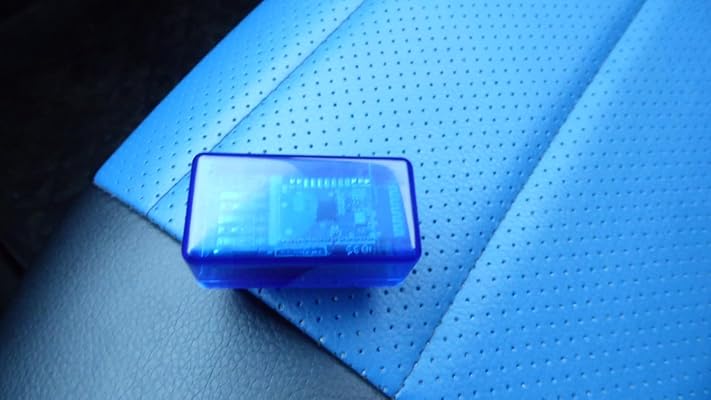
The OBD2 Scanner with WiFi V1.5 gives you access to information about your vehicle's engine, emissions, and other relevant data via your phone, tablet, or computer through WiFi.

Fast
Shipping

Free
Return*

Secure Packaging

100% Original Products

PCI DSS Compliance

ISO 27001 Certified


Note: Step Down Voltage Transformer required for using electronics products of US store (110-120). Recommended power converters Buy Now.


What Stands Out
WiFi Connectivity
Seamlessly connects with both iOS and Android devices, ensuring easy access to vehicle diagnostics without the hassle of wires, enhancing user convenience and mobility.
Error Clearing
Efficiently clears error messages, allowing users to reset their vehicle's check engine light quickly, promoting proactive vehicle maintenance and reducing unnecessary trips to the mechanic.
Wide Compatibility
Compatible with a broad range of vehicles, including those from the US (1996+) and Europe (2003+), making it a versatile tool for car owners and mechanics alike.
Product Details
- Mini WiFi OBD2 Car Code Reader - This compact WiFi OBD2 scanner V1.5 allows you access to your vehicle’s internal information through a WiFi device like your phone, tablet or laptop. This way you can retrieve information about the engine, emissions, and other relevant data. You can find out why your engine light is on and fix simple problems by yourself, making the scanner extremely convenient for any vehicle owner. Be aware: the sticker on the OBD2 may differ from the images shown!
- Reading and Clearing Error Messages – The compact OBD2 car code reader can interpret and clear over 3000 different error messages. This makes the car scanner able to interpret fault codes, clear car fault codes, display sensor data such as engine speed, car speed, coolant temperature, intake manifold pressure, air temperature intake pressure, air flow, throttle position, oxygen sensor voltage, fuel pressure and more.
- Car Compatibility – Always be vigilant about compatibility so the scanner can work effectively. American-made cars manufactured after 1996 should have no issues, while European cars may only be compatible if they were made after 2003. There must be a 16-pin data link connector under the dashboard and the vehicle emission control information label must state that the vehicle is OBD2 compliant. Important: Not for electric vehicles, hybrids and some diesel vehicles!
- Compatible with Android and iOS – The scanner works with third-party OBD apps like DashCommand, Torque, Infocar, Auto doctor, Four Stroke or OBD Fusion. The effectiveness of the scanner may be influenced by the specific 3rd party software you choose. If the scanner doesn't work, the issue is likely related to the software being used, and switching to a different app could potentially resolve the problem.
- How to Use the Car Scanner – 1. Plug the device in your car's OBD2 port which usually is located under the dashboard - 2. Start the car - 3. Enable WiFi on your phone or tablet and connect with the scanner - 4. Run the downloaded app - 5. Look for "OBD2" and connect it with your device through the app (pin 1234 or 0000) - 6. Wait until it connects your car's ECU successfully – 7. Always take the scanner out of the OBD port after you’re done. Leaving the scanner in can slowly drain your battery.
| Brand Name | MMOBIEL |
| Manufacturer | MMOBIEL |
| Item Weight | 0.3 lbs (140 grams) |
Who Should Buy?

-
Casual Car Owners
Ideal for users who want to easily monitor engine health and clear basic error codes without fuss.
-
DIY Mechanics
Suitable for hobbyists and enthusiasts looking to perform basic diagnostics and troubleshooting on their vehicles.
-
Budget-Conscious Users
Great for those wanting an affordable solution for vehicle diagnostics without needing professional tools.

-
Professional Mechanics
Not ideal for professionals needing advanced features and comprehensive diagnostics for a wide range of vehicles.
-
Older Vehicles
Incompatible with vehicles built before the specified years, limiting its use for classic car enthusiasts.
-
Complex Diagnostics
Not suitable for users who require in-depth diagnostics or repair features that exceed basic error reading.
Product Description
Have any Query? Chat with us
Customer Questions & Answers
-
Question:
What is the MMOBIEL OBD2 Scanner Bluetooth, and what does it do?
Answer: The MMOBIEL OBD2 Scanner Bluetooth is a diagnostic tool that allows users to connect wirelessly to their vehicle's OBD2 system using iOS or Android devices. It helps in reading trouble codes, monitoring real-time data, and performing system diagnostics. This tool is perfect for both DIY car enthusiasts and professionals, enabling them to diagnose issues, identify malfunctions, and maintain their vehicles more effectively. -
Question:
Is the MMOBIEL OBD2 Scanner compatible with all vehicles?
Answer: The MMOBIEL OBD2 Scanner is designed to be compatible with most vehicles manufactured after 1996 that support OBD2 protocols. It can interface with a variety of makes and models, making it versatile for users with different types of cars. However, it’s advisable to check your vehicle's specifications to confirm OBD2 compliance, ensuring you fully benefit from the scanner's features. -
Question:
How do you connect the MMOBIEL OBD2 Scanner to your smartphone?
Answer: To connect the MMOBIEL OBD2 Scanner to your smartphone, first, plug the scanner into your vehicle's OBD2 port located usually under the dashboard. Then, on your smartphone, enable Bluetooth, and search for the scanner in your Bluetooth settings. Once paired, you can use compatible apps available on the App Store or Google Play to start diagnosing issues accurately. -
Question:
Can I use the MMOBIEL OBD2 Scanner with my iPad?
Answer: Yes, the MMOBIEL OBD2 Scanner is fully compatible with iPads, as well as iPhones and Android devices. Users can download compatible diagnostic applications from the App Store, making it convenient to perform vehicle diagnostics using a larger screen. This enhances user experience when analyzing data, especially for detailed readings and real-time monitoring during vehicle checks. -
Question:
What features does the MMOBIEL OBD2 Scanner offer?
Answer: The MMOBIEL OBD2 Scanner offers a variety of features including reading and clearing diagnostic trouble codes (DTCs), displaying real-time sensor data, and supporting multiple OBD2 protocols. Additionally, it can perform system tests such as I/M readiness and provides emission readiness status. Such functionalities help both home mechanics and professionals to troubleshoot automotive issues effectively. -
Question:
How does the MMOBIEL OBD2 Scanner help with vehicle maintenance?
Answer: The MMOBIEL OBD2 Scanner assists in vehicle maintenance by providing critical diagnostic information. By identifying issues before they escalate, users can address problems proactively, potentially saving on costly repairs. Regularly interfacing with the scanner can also help monitor engine performance and health, ensuring optimal operation and longevity of the vehicle. -
Question:
What diagnostic apps are compatible with the MMOBIEL OBD2 Scanner?
Answer: Most popular OBD2 diagnostic apps are compatible with the MMOBIEL OBD2 Scanner, including Torque Pro, Car Scanner ELM OBD2, and Engine Link. These applications enhance the functionality of the scanner, allowing users to view live data, generate reports, and even customize dashboard displays. The variety of apps available ensures that users can choose the best fit for their needs. -
Question:
Can the MMOBIEL OBD2 Scanner clear fault codes?
Answer: Yes, the MMOBIEL OBD2 Scanner can clear fault codes from your vehicle’s system. After diagnosing the issue and addressing the problem, users can use the scanner to erase the trouble codes, turning off the check engine light to reset the system. This functionality helps ensure that unwanted alerts don’t remain active once repairs are made, providing peace of mind. -
Question:
What should I do if my MMOBIEL OBD2 Scanner doesn’t connect?
Answer: If your MMOBIEL OBD2 Scanner does not connect, first ensure that it is properly plugged into the OBD2 port and that your vehicle is in the 'On' or 'Run' position. Check that Bluetooth is enabled on your smartphone and that you’re trying to connect to the correct device. Restarting both the scanner and your phone may also resolve connection issues. If problems persist, consult the user manual for troubleshooting tips. -
Question:
Where can I buy MMOBIEL OBD2 Scanner Bluetooth in Liechtenstein?
Answer: You can buy the MMOBIEL OBD2 Scanner Bluetooth on Ubuy, which offers a wide selection of automotive tools and accessories, including this car diagnostic equipment. Simply visit their website and search for the product to enjoy a seamless shopping experience with various options available for your purchase.
MMOBIEL Code Readers & Scan Tools Editorial Review



The MMOBIEL OBD2 Scanner Bluetooth claims to be compatible with iOS, iPhone, iPad, and Android devices, offering a wireless OBD car code reader and diagnostic tool. However, based on customer feedback, it seems that this product has several limitations and issues. One of the main problems customers have experienced is the difficulty of connecting the device to iOS devices. According to a FAQ response, it appears that pairing this scanner with iOS devices is only possible through jailbreaking them, which is not an ideal solution for most users. This limitation renders the product unusable for iPhone and iPad users who do not wish to jailbreak their devices. Additionally, many customers have reported that the device does not work as expected, with some describing it as unreliable. Some users have encountered false fault codes, which can be alarming and lead to further issues with their cars. Others have complained that the scanner is undiscoverable on their iPhones, contradicting the product's claim of compatibility with iOS devices. It seems that the device may work intermittently or show inConsistent performance, causing frustration for customers. Overall, based on customer feedback, the MMOBIEL OBD2 Scanner Bluetooth does not appear to be a reliable and effective diagnostic tool, particularly for iOS users. It may be more suitable for Android users, as some have reported success in connecting the scanner to their devices.
Customer Reviews & Ratings
1838 customers ratings
-
5 Star
53%
-
4 Star
9%
-
3 Star
8%
-
2 Star
5%
-
1 Star
25%
Review this product
Share your thoughts with other customers
Pros
- Claims to be compatible with iOS, iPhone, iPad, and Android devices
- Offers wireless OBD car code reading and diagnostic capabilities
Cons
- Difficulty in connecting the device to iOS devices without jailbreaking
Product Price History
Important information
- Limitations : For products shipped internationally, please note that any manufacturer warranty may not be valid; manufacturer service options may not be available; product manuals, instructions, and safety warnings may not be in destination country languages; the products (and accompanying materials) may not be designed in accordance with destination country standards, specifications, and labeling requirements; and the products may not conform to destination country voltage and other electrical standards (requiring use of an adapter or converter if appropriate). The recipient is responsible for assuring that the product can be lawfully imported to the destination country. When ordering from Ubuy or its affiliates, the recipient is the importer of record and must comply with all laws and regulations of the destination country.
- Not all the products listed on Ubuy are for sale, as Ubuy is a global search engine. Products are subject to export/trade regulations.
CHF 17
Order now and get it around Thursday, June 25
This item is not restrict in my country.(Please click on above link if this item is not restrict in your country, So our team will review and allow.)
QTY:
Only 7 items left in stock.
Secured transaction
Ubuy works hard to protect your security and privacy. Our advanced payment security system ensures confidentiality by encrypting your information during transmission using AES (Advanced Encryption Standards) and SSL (Secure Socket Layer) protocols. Your payment details are 100% secure as we do not share your payment details with third party sellers.
Our Top Logistics Partners
Fastest cross-border delivery
Features & Benefits
- Access vehicle information through your phone, tablet, or computer via WiFi
- Ability to read and interpret over 3000 different error messages
- Interpret fault codes, clear car fault codes, and display sensor data
- Compatible with American-made cars after 1996 and European cars made after 2003
- Not suitable for EVs, hybrids, and some diesel vehicles
- Compatible with Android, iOS, and Windows devices, may require 3rd party software for connection